Project details

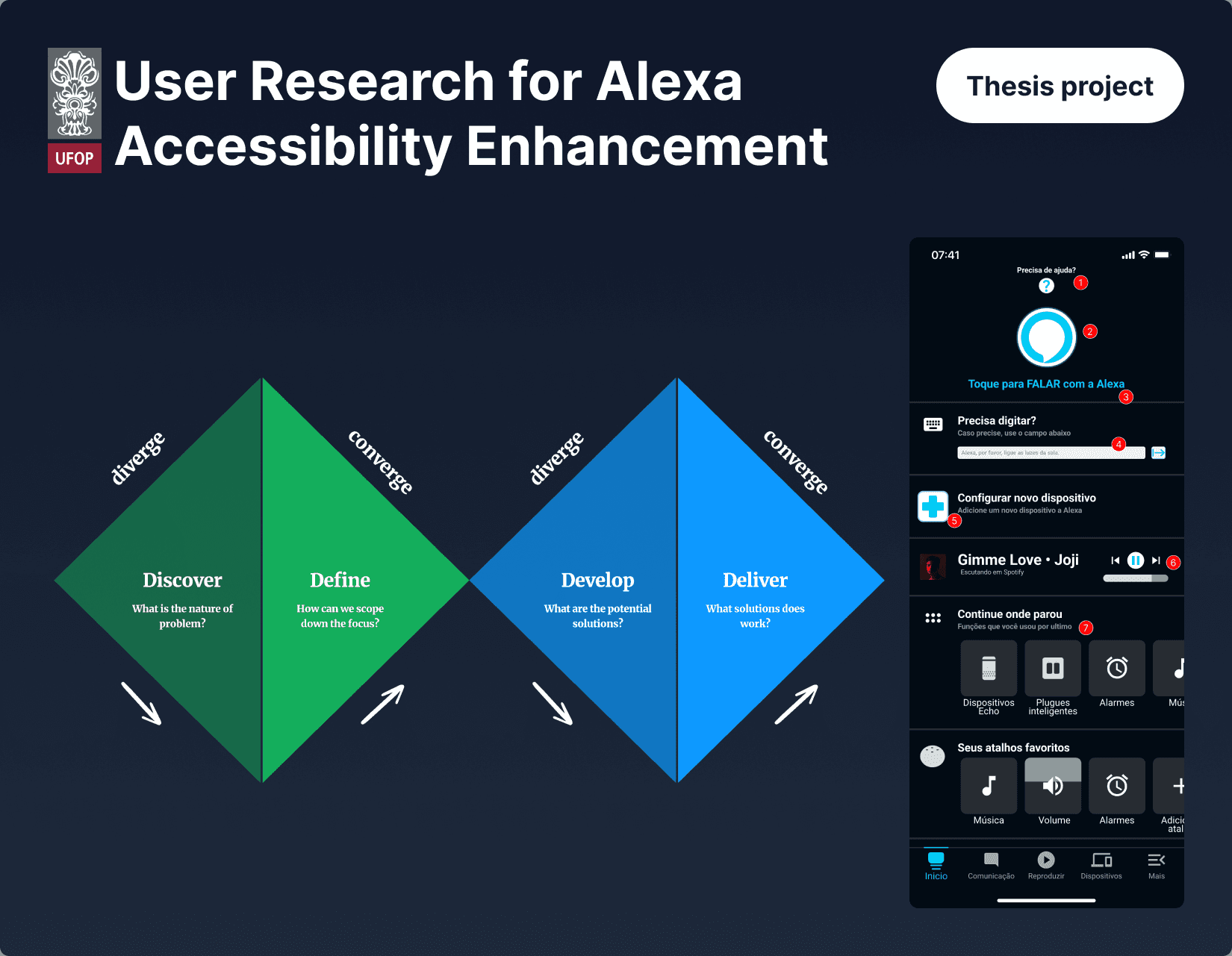
User Research for Voice UI Accessibility

Problem Context

The Amazon Alexa application presented a complex and poorly accessible interface that created significant barriers for older and technology-inexperienced users. The gap between the product's promise of simple home automation and the actual user experience demanded systematic investigation and design intervention.

Target Audience Analysis

Critical Findings

Landing Page Analysis

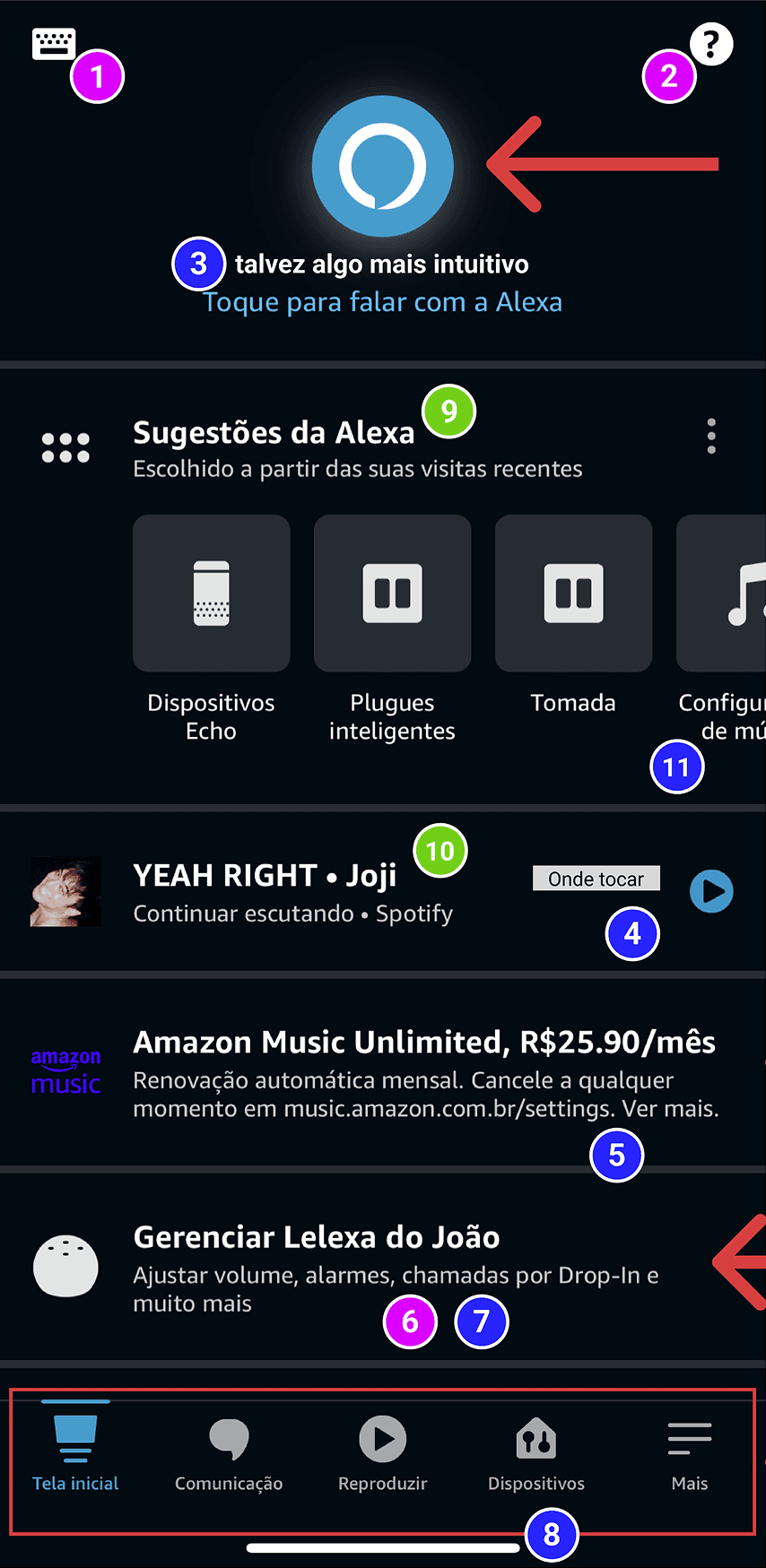
Interface problems identified: Features without descriptions causing cognitive confusion. Features lacking visual prominence. Ambiguous descriptions creating user confusion. Underdeveloped functionalities. Advertisements disrupting task flows and usability. Repeated features creating informational redundancy. Improperly implemented carousels violating ISO 9241 guidelines.

Devices Screen Analysis

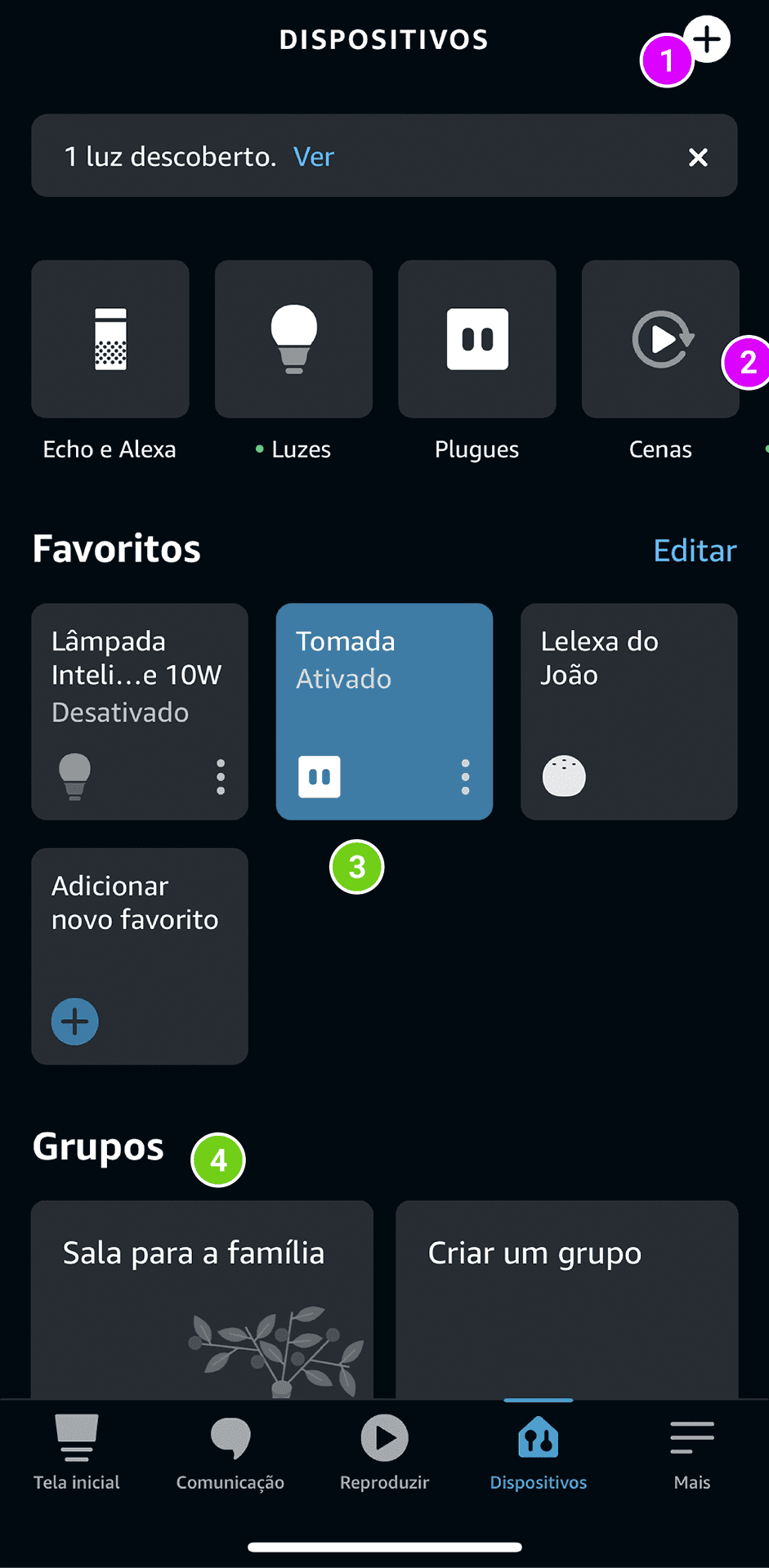
Critical issues identified: Features lacking prominence and clear visual hierarchy. Improperly implemented carousel functionality affecting navigation flow.

Research-Validated Hypotheses The app contains valuable resources made inaccessible by design limitations. The device addition process creates unnecessary friction in the onboarding experience. Accessibility features such as keyboard support for hearing-impaired users exist but remain difficult to locate and use. Device integration complexity undermines the seamless experience expected in home automation systems.

Central Research Insight Review analysis confirmed that users experience a significant gap between expectations of simple automation and the reality of complex, unintuitive processes. Key finding: accessibility challenges particularly affect new technology users, and adding new devices proves more difficult than expected.

Critical Findings

Landing Page Analysis

Interface problems identified: Features without descriptions causing cognitive confusion. Features lacking visual prominence. Ambiguous descriptions creating user confusion. Underdeveloped functionalities. Advertisements disrupting task flows and usability. Repeated features creating informational redundancy. Improperly implemented carousels violating ISO 9241 guidelines.

Devices Screen Analysis

Critical issues identified: Features lacking prominence and clear visual hierarchy. Improperly implemented carousel functionality affecting navigation flow.

Research-Validated Hypotheses The app contains valuable resources made inaccessible by design limitations. The device addition process creates unnecessary friction in the onboarding experience. Accessibility features such as keyboard support for hearing-impaired users exist but remain difficult to locate and use. Device integration complexity undermines the seamless experience expected in home automation systems.

Central Research Insight Review analysis confirmed that users experience a significant gap between expectations of simple automation and the reality of complex, unintuitive processes. Key finding: accessibility challenges particularly affect new technology users, and adding new devices proves more difficult than expected.

Critical Findings

Landing Page Analysis

Interface problems identified: Features without descriptions causing cognitive confusion. Features lacking visual prominence. Ambiguous descriptions creating user confusion. Underdeveloped functionalities. Advertisements disrupting task flows and usability. Repeated features creating informational redundancy. Improperly implemented carousels violating ISO 9241 guidelines.

Devices Screen Analysis

Critical issues identified: Features lacking prominence and clear visual hierarchy. Improperly implemented carousel functionality affecting navigation flow.

Research-Validated Hypotheses The app contains valuable resources made inaccessible by design limitations. The device addition process creates unnecessary friction in the onboarding experience. Accessibility features such as keyboard support for hearing-impaired users exist but remain difficult to locate and use. Device integration complexity undermines the seamless experience expected in home automation systems.

Central Research Insight Review analysis confirmed that users experience a significant gap between expectations of simple automation and the reality of complex, unintuitive processes. Key finding: accessibility challenges particularly affect new technology users, and adding new devices proves more difficult than expected.

Design Interventions

Redesigned Main Screen
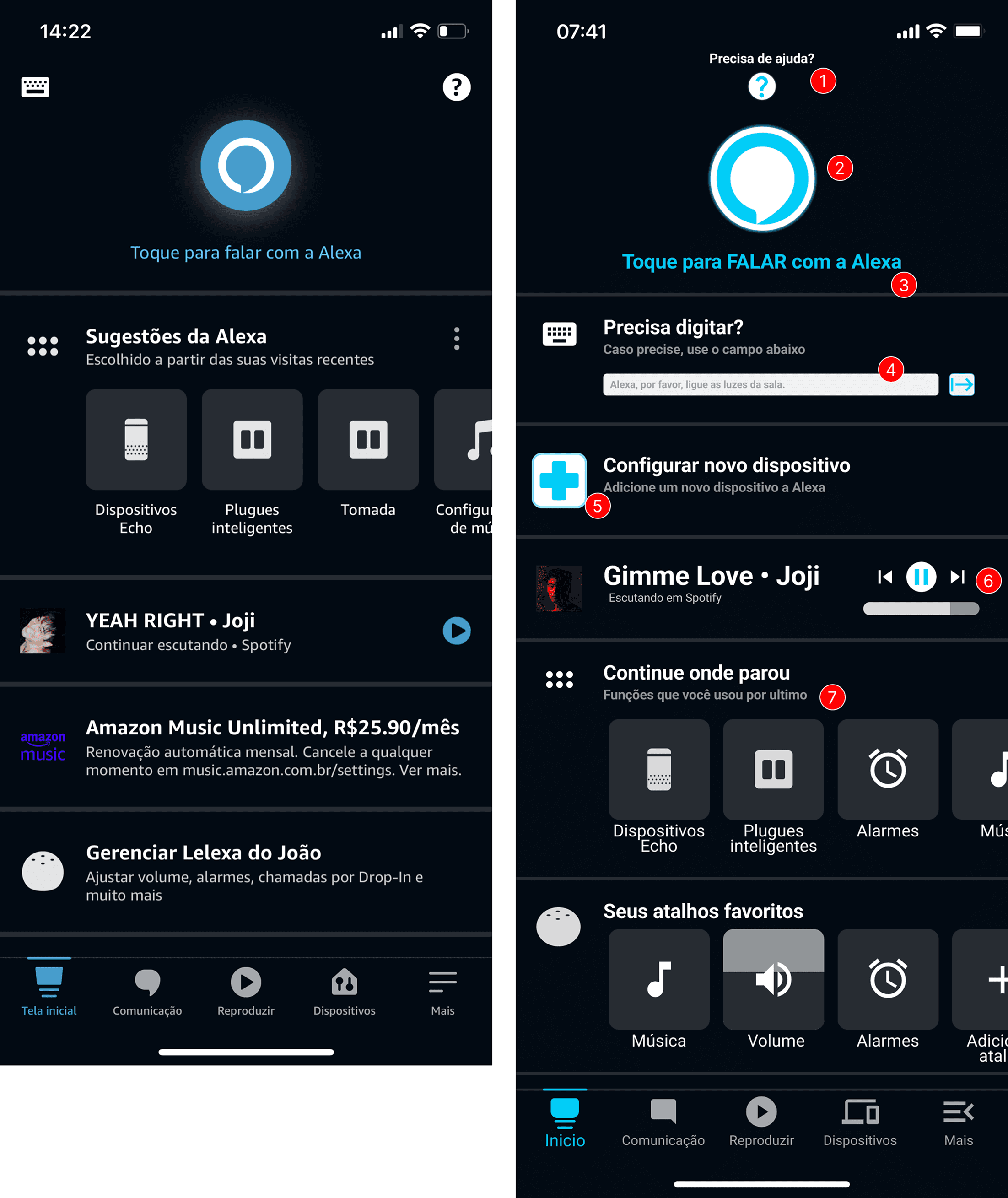
Strategic improvements implemented: Help function repositioned at the top for immediate access. Interaction icon enlarged for improved visibility. Alexa button description highlighted for clarity. Enhanced keyboard accessibility for communication. Improved identification of device adaptation function for automation. Optimized music player integration. Added shortcuts for frequent users of the application.


Redesigned Devices Screen
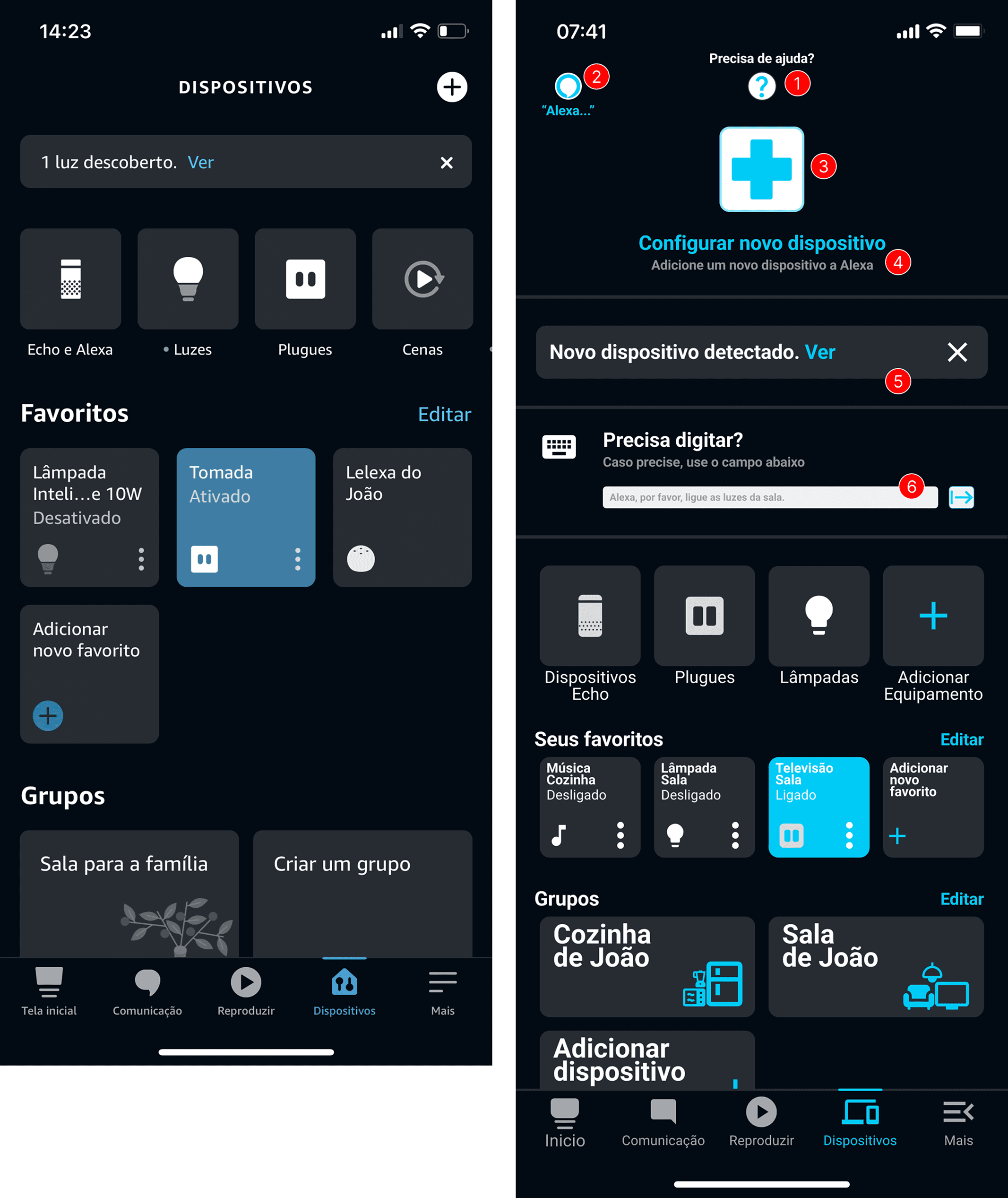
Targeted solutions implemented: Prominent help button with clear descriptions. Voice communication button for facilitated device interaction. Visually emphasized "Add Device" button for improved discoverability. Enhanced button descriptions for better usability comprehension. Improved visibility of device discovery status. Integrated keyboard functionality for accessibility support.

Study Outcomes

Problems Addressed The proposed screens systematically addressed fundamental usability issues, specifically in device addition workflows and quick on/off interactions. The design solutions directly respond to accessibility barriers identified through user research and documented through visual analysis.

Academic Contribution This case study demonstrates a structured approach to identifying and addressing accessibility gaps in existing consumer technology interfaces. The methodology combines direct user testing with systematic feedback analysis and visual documentation to inform evidence-based design decisions.

Study Limitations Analysis focused on two critical screens within a larger application ecosystem. Solutions proposed represent design concepts developed for academic analysis purposes without formal approval from Amazon or modification of the original application.

Create a free website with Framer, the website builder loved by startups, designers and agencies.